The family photo guide
How to add a person to a photo
To add a person to a photo, place their image on a separate layer, mask away the background, then match their size, lighting and colour to the group. If your goal is a family keepsake, you can also use the photos to create an entirely new painted portrait.
By Amber Portraits · Reviewed 8 November 2026
Do you want to edit a photograph or make a new portrait?
Keep the existing photograph
Use a photo editor when the original setting, clothes and arrangement must stay. Layers and masks give you control over the added person. You still need to match perspective, light and edges, or ask a photo retoucher to do that work.
Create a new family artwork
Choose Together Portraits when you want a new oil-style composition guided by family photos. It can bring separate people together, but it may reinterpret poses, surroundings and details. Review every face in the preview.
Add someone to a photo in six steps
STEP 1
Choose compatible photographs
Use a clear picture of the person and a base photo with room for them. Similar camera height, face direction and light make the combination more convincing. A seated person usually fits a seated group more naturally than a sharply angled selfie.
STEP 2
Put the person on a separate layer
Open the base picture in a photo editor with layers. Place the other photo above it, then select the person. Keep the original files so you can return to them.
STEP 3
Use a mask to hide the unwanted background
Add a layer mask to the person’s layer. Refine the hair, shoulders and spaces around arms. A mask lets you hide or restore an edge without permanently deleting that part of the image.
STEP 4
Match size and position
Resize and position the person to fit the group’s perspective. Compare head sizes and where feet meet the ground. Let one person overlap another where it makes physical sense, without covering important faces.
STEP 5
Bring the light and colour together
Adjust the added layer’s brightness and colour to sit with the base photo. Check the direction of light and whether a contact shadow is needed. Matching colour alone will not fix a person lit from the opposite direction.
STEP 6
Review the edges and save an editable copy
Look closely at hair, hands and clothing, then view the whole picture at its intended display size. Save a version with layers before exporting a copy. Label the result as an edited picture when that context matters.
For software-specific controls, follow Adobe’s guide to combining images in Photoshop, its layer mask tutorial and instructions for matching colour between layers. The steps above are a general workflow, not a demonstration of those tools inside Amber.
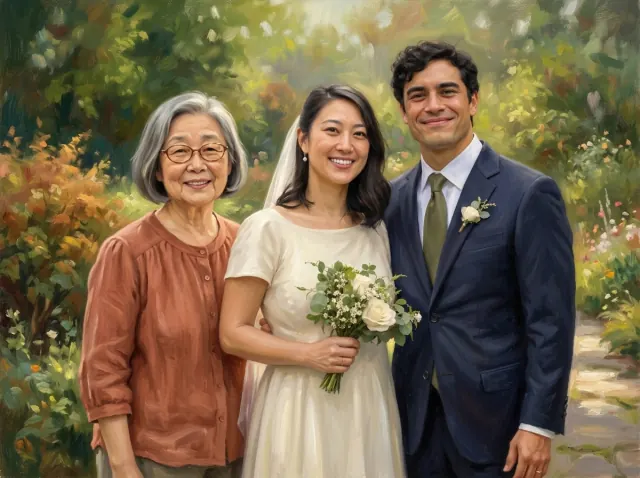
2 reference photos · 3 people
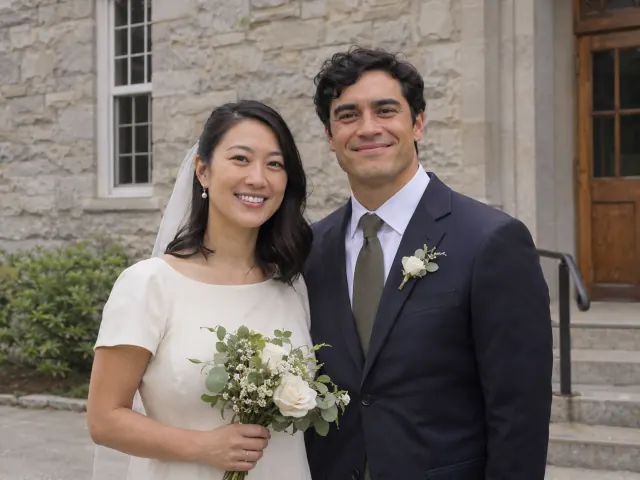
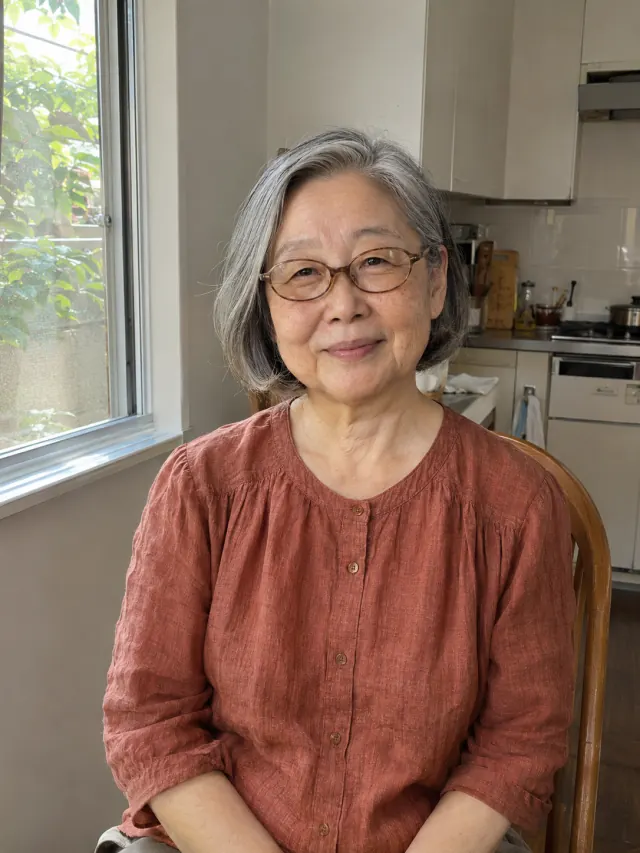
A wedding keepsake with Grandma
A wedding reference and a separate grandparent photo guide a new painted scene.
A different way to bring people together
When a new family portrait is what you want
This fictional demonstration uses a wedding couple’s reference and a separate photo of Grandma. Together Portraits created a new garden composition. It did not insert Grandma into the original photograph.
- Add the group photo and a clear reference of the person to include.
- Choose landscape or portrait and create your free preview.
- Check every face and the arrangement. Use Edit portrait to request changes before ordering.
Free preview. Prints and digital downloads are paid.
Explore the AI family portrait examplesWhy does an added person sometimes look out of place?
The camera angle differs
A face photographed from above may look wrong beside a group photographed at eye level. Try another reference before spending time on edge cleanup.
The light comes from another direction
Compare shadows on noses and under chins. A small colour adjustment cannot recreate the shape of missing light.
The reference is too small
A blurry face can stay blurry when enlarged. Look for the original photo rather than a screenshot of a screenshot.
Use photographs you own or have permission to edit. For more help selecting family references, read our photo preparation guide.